
My Role: Principal Designer
Core Team: Principal Designers, Junior Designers, Design Technologists
Links to Design Docs
Patents Awarded
- Desktop reveal by moving a logical display stack with gestures
- Method and system for viewing stacked screen displays using gestures
- Methods and systems for presenting windows on a mobile device using gestures
- Universal clipboard
Overview
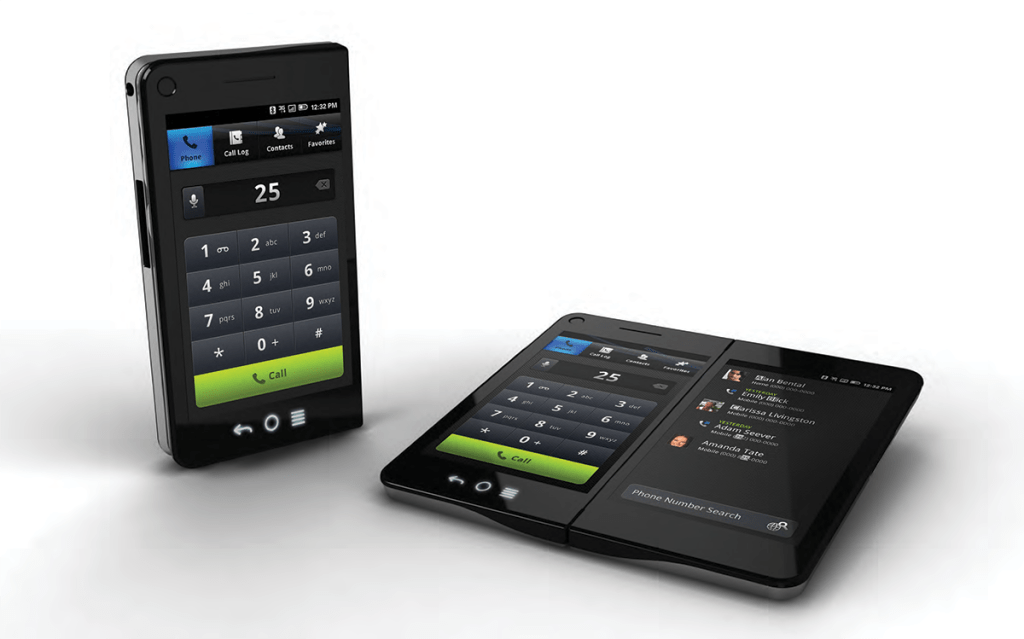
Years before foldable phones entered the consumer market, I co-led the interaction design for a dual-screen Android phone — from the system-level interaction framework to the core application suite.
The Design Challenge
A dual-screen phone doesn’t just double the screen real estate; it fundamentally changes the relationship between the user and their applications.
Every assumption baked into single-screen mobile interaction had to be reconsidered: How do apps launch? Where do they appear? What happens when you rotate the device? How do you move content between screens? How do you avoid overwhelming users with complexity while still delivering on the promise of two screens?
And once you’ve answered those questions at the system level, you have to prove the framework actually works by designing the applications that live inside it.
We understood that the underlying system could be very complex, but the user should never feel that complexity. When two equally good options existed, we ruled in favor of the user.
The Interaction Framework
Window Positioning Model
Managed application placement across single (closed) and dual (open, side-by-side) modes, with rules for repositioning, maximizing, minimizing, and stacking application “cards”. A lightweight windowing system for mobile.
Four Application Models that gave developers a clear framework for how any app could leverage dual screens:
- Parent-Child: hierarchical navigation with the parent on the left and progressively deeper levels on the right, preserving context at every level
- Parallel View: simultaneous views of the same content (e.g., map + turn-by-turn directions side by side), which we identified as the key differentiator for the device
- Exposé: a control panel on one screen surfacing features and shortcuts that would otherwise be buried in menus, freeing the other screen entirely for content
- Expand: landscape orientation as a “special view” for dual-screen apps, deliberately constrained to reinforce its uniqueness and reduce confusion
Custom Gesture Language
Introduced three new gestures (Swap, Spread, and Pin & Drag) alongside standard Android gestures, carefully limited to avoid cognitive overload. Each gesture was mapped to specific behaviors in both single and dual-screen modes.
Orientation Guidelines
Built on a “gravity” model that governed what happened when the device rotated between portrait and landscape, with rules designed to keep the experience simple and predictable even as the physical relationship between screens changed.
Global Interaction Patterns for text entry, copy/paste, drag and drop, and a universal clipboard designed to work in a two-screen context.
The Application Suite
The interaction framework had to prove itself in practice. We designed five core applications, each putting different application models to work and demonstrating how a dual-screen device could deliver experiences that a single-screen phone simply couldn’t.
Phone
The dialer and in-call experience used the Exposé model to transform the second screen into a contextual workspace: while on a call, the adjacent screen could surface quick notes, contact details, or search. The app handled 15+ distinct call management flows across every orientation, with the tab-based navigation mapping to a Parent-Child hierarchy underneath.
Contacts
Built on the Parent-Child model, the contacts experience used the second screen to show a contact card alongside the contact list, so users never lost their place while browsing. A Quick Communication Bar let users call, text, or email directly from any contact’s thumbnail without opening the full card. An Activities stream aggregated all communication history per contact across apps giving users a unified relationship view.
Messaging
Designed for the conversational paradigm that was still relatively new on mobile at the time, with the dual-screen layout enabling a conversation list and active thread to be visible simultaneously.
Photos
A media experience designed to take advantage of dual-screen real estate for browsing and viewing, with the second screen enabling richer workflows around editing, sharing, and organizing photo libraries.
Music
An audio experience that leveraged the Exposé model to surface playback controls and library browsing side by side.
Design Approach
Each application was documented with the same rigorous structure: design concepts and rationale, application maps showing every screen and state, wireframes for all orientations and screen configurations (portrait single, portrait dual, landscape single, landscape dual), and step-by-step task flows annotated with interaction details. The Interaction Guide itself was structured as a living resource with three layers: rules (for engineering and QA), explore sections (for user testing as code took shape on the device), and demos that showed the interactions in motion.
The work was grounded in principles of simplicity, direct manipulation, and user control. We took a strong editorial point of view rather than exposing every possible configuration to the user.
Why This Matters
This project required designing an entirely new interaction paradigm. There was no existing pattern library for dual-screen phones. Every decision, from how a flick behaves differently than a drag, to why landscape mode intentionally limits navigation, to how a contact card positions itself relative to the contact list in dual-screen portrait, had to be reasoned through, tested, and documented in enough detail that an engineering team could build it while preserving the design intent.
The scope of the work demonstrates something important: the ability to move between abstraction levels. Defining a window positioning model is systems thinking. Designing 15 call-management task flows across four orientations is detail work. Creating the rules and proving they hold is what makes an interaction framework credible.
The interaction model we developed anticipated many of the same challenges that companies like Samsung and Microsoft would face later with their own foldable devices.
 VAQUITA DESIGN