
My Role: Principal Designer
Core Team: Principal Designer, ACD, Junior Designer, Visual Designer, Product Manager (Client), Design Technologist
Links to Design Docs
- Initial Sketches (pdf)
- Interaction Design (pdf)
- Prototype (mp4)
- Research (Google doc)
Patents Awarded
Overview
I led the interaction design for Mainframe 2.0, a reimagining of how database administrators work with mainframe systems. The project took what had been a fragmented landscape of command-line tools and siloed applications and unified it into a single, visual, collaborative workspace.
The Design Challenge
The client had a problem that went beyond software. Mainframe database administration — the work of keeping the systems that run banks, airlines, and governments healthy — was facing a workforce crisis. The field’s aging experts were the only people who knew how to use the programming languages and command-line interfaces that the product suite required. And the software itself was part of why the field couldn’t attract younger IT talent: the tools looked and behaved like they were built in the 1980s, because many of them were.
The directive was to modernize the software so that wouldn’t be the barrier to entry for new people, while simultaneously not disrupting the workflows of DBAs who had been doing this for decades.
In practice, this meant designing for two user populations with fundamentally different needs and working styles. Senior DBAs could diagnose problems faster on a command line than most people can with a mouse. They had every keyboard shortcut memorized. Any design that slowed them down or patronized their expertise would be rejected immediately. New administrators needed guidance, context, and a visual foothold into systems they were still learning. A design that dropped them into a sea of cryptic objects and metrics would fail them, too.
To get this right, I conducted many SME interviews at NOCs and contextual inquiries with DBAs across experience levels, observing how they actually worked: the sticky notes on their monitors, the knowledge passed between cubicles, and the multiple applications they toggled between during a single investigation. Multiple rounds of usability testing with prototypes followed. Through research and iteration we arrived at a design that both populations could accept, which in a domain this specialized, was genuinely difficult to achieve.
What We Designed
The interaction model was built around four core concepts that worked together as a system.
The Workspace
A customizable, module-based “home” from where DBAs could create multiple named workspaces organized by functional area (database, systems, application development, security). Within each workspace, users could add, arrange, and configure modules in either a grid layout or freeform mode, choosing from a library of widgets for alerts, tasks, monitoring, bookmarks, search, and more. The workspace was designed to accommodate individual work styles rather than imposing a single prescribed view.
The Investigator
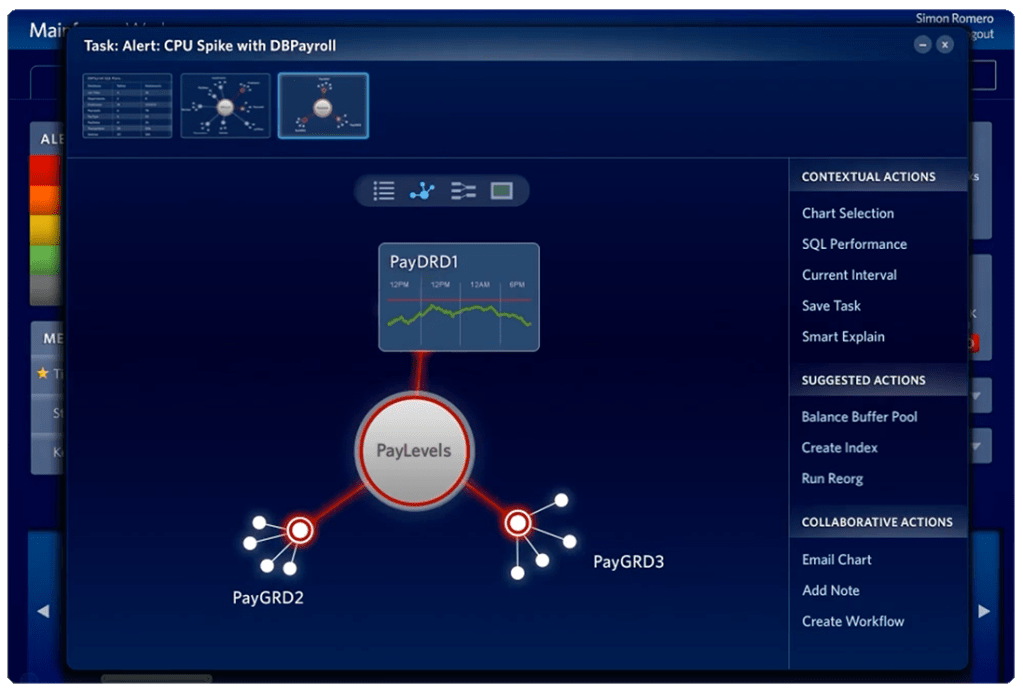
A focused, contextual tool for drilling into problems. When a DBA received an alert or picked up a task, they could drag it into the Investigator, which would surface expanded context like suggested workflows, performance snapshots, links to related objects, and even the names of team members with relevant expertise. The Investigator provided multiple view modes (chart, tabular, tree, and a visual object-relationship browser) so DBAs could approach a problem from whatever angle made sense. It also maintained the classic “green-screen” view as a first-class option, respecting the mental models of experienced users rather than forcing them into an unfamiliar paradigm.
Paths
This was the most innovative element. The system automatically recorded a user’s navigation as they worked through a problem. It tracked every page visited and every action taken. That recorded sequence could then be annotated with explanatory notes, named, and saved as a reusable path. Paths could be attached to tasks, stored in personal collections, or shared to a common repository. In practice, this meant a senior DBA could solve a complex issue once and turn their investigation into a step-by-step guide that any teammate could follow. It was knowledge management built directly into the act of doing the work, rather than requiring a separate documentation effort.
Collaboration
We baked this into the entire system. Notes could be attached to any object or chart. For example, a DBA could flag that performance on a particular subsystem always degraded on Mondays, and that note would be visible to anyone who encountered that object in the future. Tasks could be created, assigned, and tracked with priority levels and attachments. An expert directory surfaced people with relevant knowledge. The design assumed that database administration is inherently a team activity, even though the existing tools treated it as solitary one.
Why This Matters
This project required solving a problem that many enterprise software teams still struggle with: how to modernize a tool for a new generation of users without alienating the experts. The answer wasn’t a compromise or a lowest-common-denominator interface. It was a system designed with enough flexibility that both populations could work the way they needed to.
The Paths concept in particular addressed the deeper organizational problem the client tasked us with solving; make the knowledge of experienced DBAs transmissible, so that expertise didn’t walk out the door when people retired.
 VAQUITA DESIGN